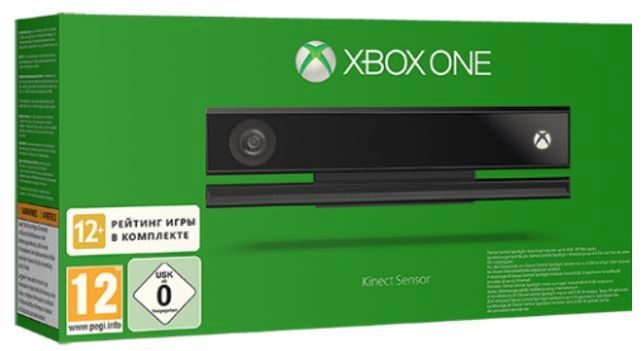
Xbox One Kinect Sensor for Xbox One & PC
Tweedehands
Dit product is tweedehands verkrijgbaar.
Beschikbaarheid in de winkel controleren
NEUF
99.95€
CASH INKOOP
Verander je games in geld
Wij kopen je tweedehands games terug — breng binnen, wij schatten, jij vertrekt betaald.
1Breng je games
2Gratis schatting
3Cash betaald
Tweedehands kopen voor een prikje
Bekijk de aanbiedingen
IK VERKOOP
Verdien cash met je games
Directe inkoop, betaald in cash of in een verhoogde aankoopbon.
Verkoop mijn games
IK KOOP
Je games tweedehands voor een prikje
Een ruime keuze aan tweedehands games, garantie inbegrepen.
Bekijk tweedehands Beschikbaarheid in de winkel
Dit product is al 62 keer verkocht in onze winkels
| Winkels | Nieuw | Tweedehands | Min. prijs |
|---|---|---|---|
| Brussel - Beurs | - | ||
| Doornik | - | ||
| Elsene | 30.00 € | ||
| Gembloux | - | ||
| Gosselies by Gamecash | - | ||
| Hannut | - | ||
| Hoei | 30.00 € | ||
| LLN by Gamecash | 45.00 € | ||
| Luik | - | ||
| Moeskroen | - | ||
| Namen by Gamecash | - | ||
| Nijvel centrum | - | ||
| Ukkel Centrum | - | ||
| Verviers | - | ||
| Ville 2 by Gamecash | - | ||
| Waver | - |
Beschikbaar
Beschikbaar binnen 24u
Gereserveerde voorraad
Niet beschikbaar
Kenmerken
- Streepjescode : 889842105636
- Productcode : 83166
- Plateform : Xbox One
- Uitgever : Microsoft
- Release datum : Datum niet meegedeeld
Beschrijving
Xbox One Kinect Sensor for Xbox One & PCThe best Xbox One experience is with Kinect
Experience greater convenience and control with Kinect for Xbox One. Command your Xbox and TV with your Cortana, make Skype calls in HD, and play games where you are the controller.
Kinect for Xbox One is compatible with the Xbox One; Xbox Kinect Adaptor required for use with Xbox One S consoles and PC.
Voice Commands
Experience greater convenience and control with Kinect for Xbox One. Navigate your console without lifting a finger. Instantly capture screenshots and game clips. And change TV channels without ever searching for the remote.
It’s time to get the most out of your Xbox One.
- Instantly switch between your games, TV and apps
- Make Skype calls in HD and send messages
- Control video and music playback
- Change the channel and volume of your TV
Cortana comes to Xbox One
Cortana is your personal gaming assistant. Everything you love about Cortana on your Windows 10 devices is now on Xbox One. Use "Hey Cortana..." to call up commands.
You can even configure your Xbox One to turn on other devices, like your TV, audio/video receiver and cable/satellite receiver. Take command of your entertainment.
Automatic Recognition
Kinect eliminates the need to manually switch or sign into your Xbox account. Be recognised and signed-in automatically when turning on your console, so that you can spend more time gaming.
Multi-tasking made easy
By snapping an app with Kinect Voice Commands, you can multitask the activities most valuable to you. Simply move the app to one side of your screen where it will continue to run while you do something else on the main part of your screen.
Now there’s no need to choose between playing a game or checking up on American football scores. Do both by simply saying “Xbox, snap NFL” and continue playing, all without interrupting your game.
Connect with Skype and Twitch
Keep in touch with friends and family on your TV with Skype for Xbox One. With its 1080p HD camera, Kinect delivers a highly detailed picture, and its microphone array picks out your voice above any other sound in the room, so no one will ever miss a beat.
You can even broadcast your gameplay live with picture-in-picture through Twitch. Just launch the app and simply say “Xbox, Broadcast”.
Onze andere producten
Producten die u misschien interesseren
Beoordelingen 0
Wees de eerste om een reactie achter te laten!
U bent niet ingelogd. Om een reactie achter te laten, log in of
Sociale netwerken